

Clio is the name you hear whenever one lawyer asks another what legal practice management software to use. The company says more than 400,000 legal professionals use it, and 94% of its 1,746 Capterra reviews are positive. None of that tells you whether Clio fits your law firm, or what you'll actually pay once the add ons and card fees land on your statement.
This review is for managing partners, solo attorneys and the office managers who end up running the software. We went line by line through Clio's pricing page, read reviews on Capterra, G2, GetApp and Trustpilot, and studied an r/LawFirm thread where attorneys talk about Clio with no sales rep in the room.
You'll see what each plan costs, which features sit behind upgrades, what users love and what they regret, and when a lighter tool makes more sense. We build Lexra, a legal practice management platform that costs $30 per user, so we have a stake here. We'll still tell you where Clio wins, because for some law firms it clearly does.
Clio at a glance
Clio, a Canadian legal tech company launched in 2008, sells Clio Manage as its core legal practice management software. Clio Grow, Clio Accounting, Clio Draft and Manage AI sit around it as add ons.
Pros
- Matter management, document management, time tracking, legal billing and trust accounting in one login
- Trust accounting and trust reports on every plan
- More than 300 integrations from Essentials up, including QuickBooks Online and Xero
- Fast mobile time entry, so fewer billable minutes slip away
Cons
- Only EasyStart has a public price
- EasyStart leaves out templates, custom fields, the secure client portal and accounting integrations
- Clio Grow, Clio Accounting, Clio Draft and Manage AI all cost extra
- Reviewers report recurring sync glitches
- Clio sells to large firms as well as solos, so small firms and solo legal practices often pay for features they never open
Clio feature overview
Here's how each part of this legal practice management software works day to day, and which plan you need for it.
1. Case and matter management
Matters are the center of Clio Manage. Each matter holds client information, contacts, notes, tasks, calendar events, documents and time entries, so anyone who opens the file sees where it stands. Task management, calendaring and unlimited document storage come with every plan.
The real question is how much you can shape it on each tier. Custom fields and matter templates start on Essentials. Matter stages, which show your cases on a kanban board, start on Advanced. On EasyStart you get solid case management basics and very little room to fit them to how your law firm works. A family law practice and a personal injury practice track very different details, so test this early.
Court calendaring rules have caps too. You get 3 per firm on Essentials and 10 on Advanced. If you litigate in several courts, count them before you buy.
2. Time tracking and legal billing
This is where Clio earned its name as legal billing software. You can track time with a running timer or by hand, set rates per user or per matter, and generate invoices at the end of the month. Clio supports hourly, flat fee and contingency billing, plus UTBMS codes and LEDES on every plan. That matters when insurers or corporate clients pay your bills.
Expense tracking sits next to time entries, so hard costs land on the right invoice. Reviewers like how fast they can track time from the mobile app or from Gmail. One said their billing and collections went up after switching because the Gmail feature reminded them to bill for emails. Another said it takes way too many clicks to bill clients. Split billing, matter budgets and custom reports on your billing data all wait on Advanced.
3. Trust accounting
If your law firm holds client money, this is Clio's strongest argument. Trust accounting comes with every plan, and Clio supports trust requests clients can pay online, trust balances on invoices and trust reports. Trust balance notifications start on Essentials.
Clio says 100 bar associations and law societies approve its software. Still, check your own jurisdiction's trust accounting rules, because they differ across the US, Canada, the UK and Australia. One Capterra reviewer said Clio falls short when a law firm runs several trust and operating accounts, so map yours during the trial.
4. Clio Accounting
Clio Accounting is an add on, available only in the US, that puts your books next to your matters. Clio launched it in 2024. It includes a financial dashboard, bank account sync, accounts receivable, a chart of accounts, expense and vendor management, trust and operating reconciliation, and financial reports. Your outside accountant gets free access to Clio Accounting.
When Lawyerist reviewed it, Clio Accounting cost $29 per user per month on annual billing and $39 on monthly billing. Clio now gives the price through its sales team, so ask for a current quote. The same review flagged two limits. Clio Accounting works on a cash basis only, and at the time it had no permission controls, so anyone with access could see everything.
Can Clio Accounting replace QuickBooks Online? It can for a law firm with simple books on a cash basis. Legal practices with complex reporting, or a CPA who works in QuickBooks Online or Xero, usually keep that tool and connect Clio to it instead. Test the sync first. One reviewer said expenses from QuickBooks arrived as a single entry they had to fix by hand.
Can Clio Accounting replace your bookkeeper? No. It cuts down data entry and administrative tasks, but reconciliations, tax filings and odd entries still need a trained person. Treat Clio Accounting as a cleaner ledger, not a new hire.
5. Clio Grow and client intake
Clio Grow handles client intake. It covers online intake forms, appointment booking, automated client emails, a lead pipeline and referral reporting. When a lead becomes a client, you send the matter into Clio Manage, which saves duplicate data entry. In August 2026, Clio added Grow AI. It puts intake agents on your phone, email and website chat, and Clio bills it per converted lead rather than per seat.
Clio Grow comes bundled only with Expand, the top tier. On the other plans it's an add on with no public price. One paralegal on Capterra called the split between Grow and Manage their only gripe. On Reddit, one Clio user said parts of Clio Manage are "very good," but called Grow, Draft and Accounting mediocre and "badly integrated."
6. Document management and integrations
Every plan includes unlimited document storage, and Clio supports Gmail and Outlook integration across the board. Document templates, a virtual desktop drive for PC and Mac, and the app directory start on Essentials. Clio Draft adds document automation for court forms and other legal documents as a paid add on. Electronic court filing is built in for California, Texas and Georgia state courts, and you pay per filing.
The app directory is how most law firms connect Clio to Zapier, Box, Dropbox and accounting tools. If your team lives in Outlook and Microsoft Teams, test how email and calendar sync behave in your setup before you commit. Reviewers mention occasional document sync issues, and one said a missing offline mode is the only thing that would make them leave.
Clio pricing in 2026
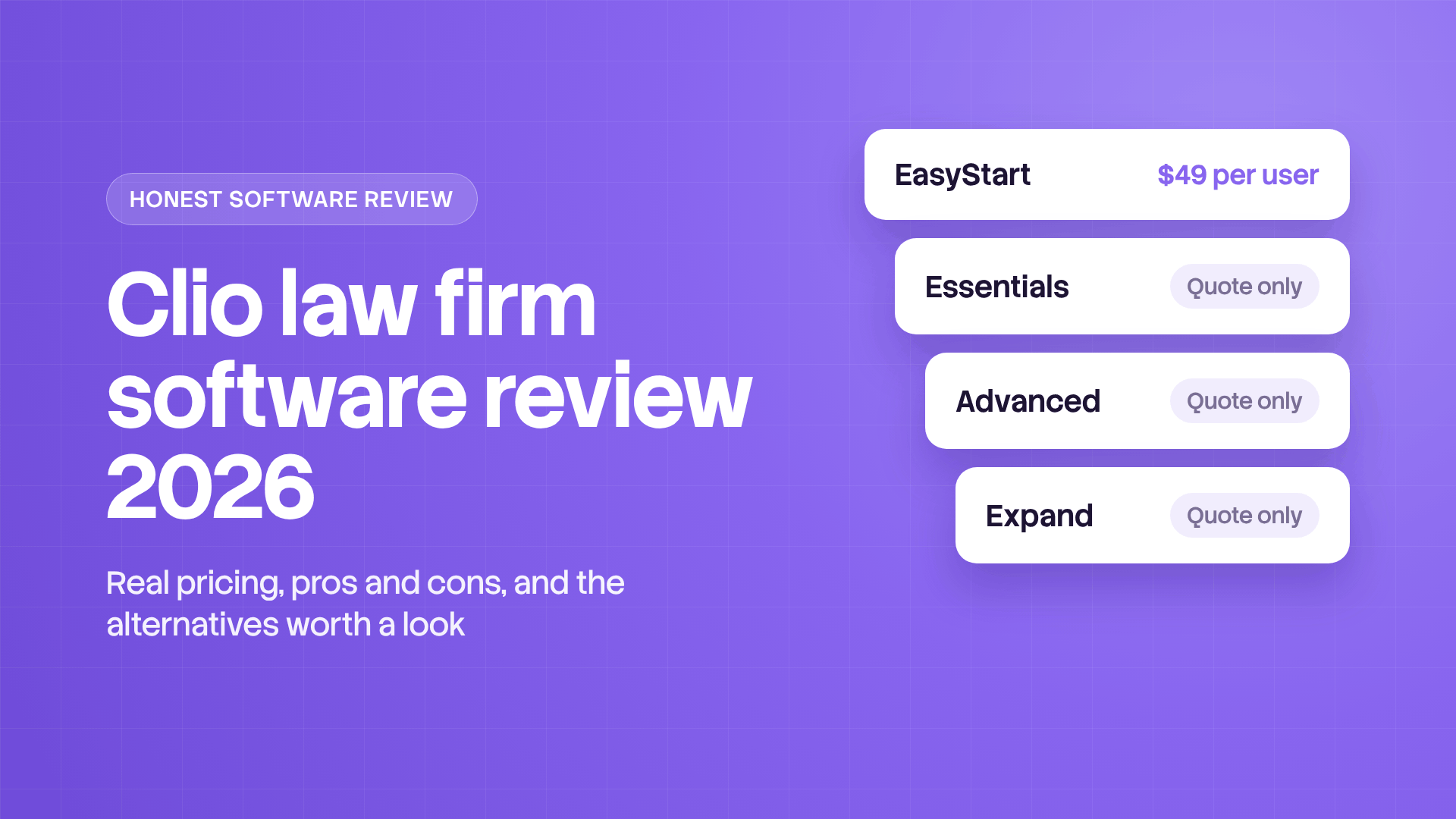
Clio publishes one price for its legal practice management software. Everything above it goes through Clio's sales team.
The estimates come from CostBench, which last checked Clio's prices in June 2026. Annual billing is the cheaper option, and CostBench puts monthly billing about 20% higher on every tier.
The add ons come next. Clio sells Clio Grow, Clio Accounting, Clio Draft for document automation, Manage AI, Clio for Personal Injury and a HIPAA business associate agreement separately. None of them shows a price on Clio's page.
Payments sit on top of that. Clio Payments charges 2.95% on standard cards, 3.75% on Amex, 1% on eCheck and ACH, and 4.95% for Pay Later with Affirm. Online payments improve the client experience, and every one of them carries a fee.
A worked example for a law firm of three
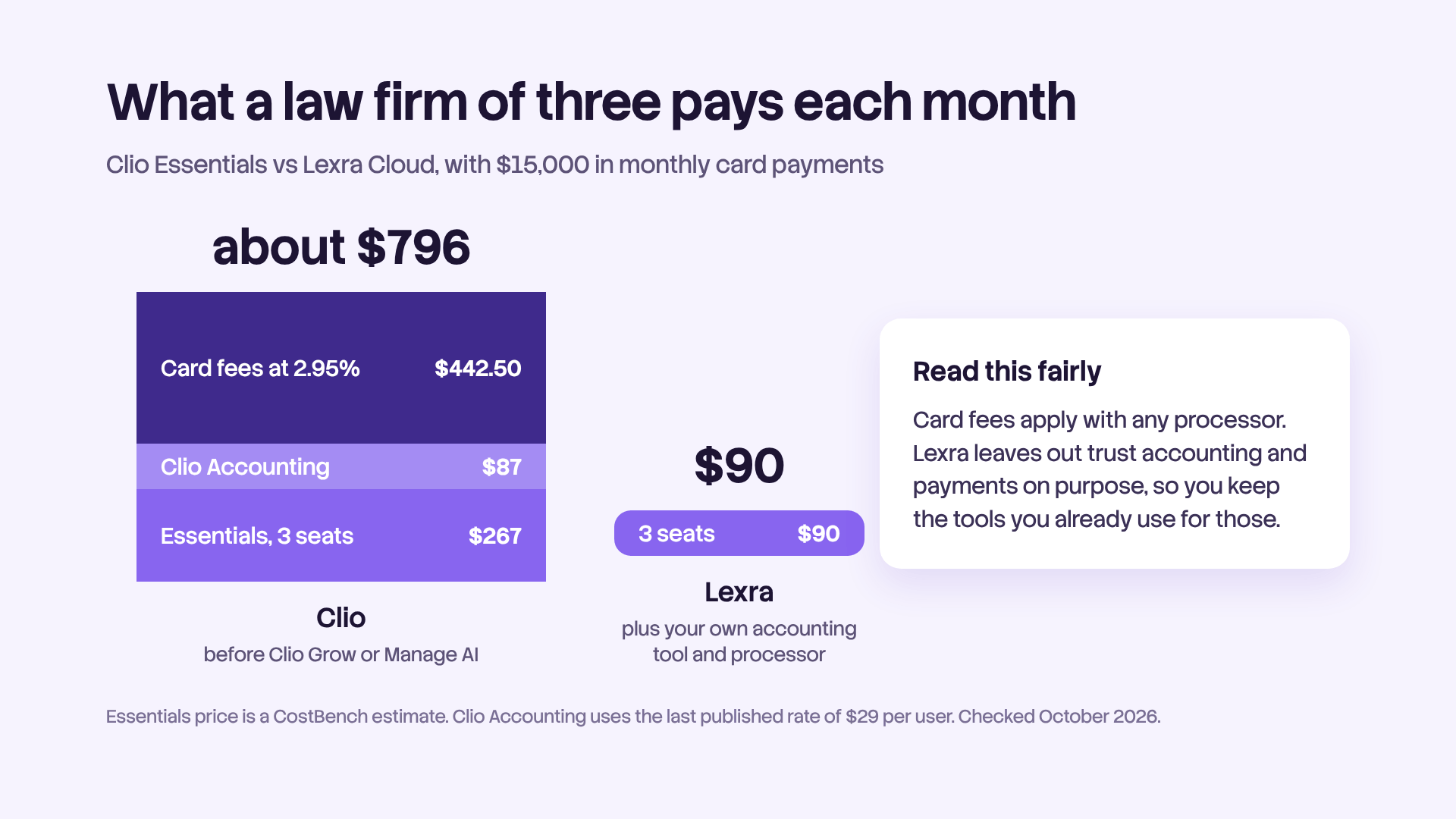
Three seats on Essentials at about $89 come to roughly $267 a month. Add Clio Accounting for all three at the last published rate of $29 and you're near $354. If clients pay $15,000 a month by card, processing takes another $442.50. That's close to $800 a month before Clio Grow or Manage AI. If your CPA prefers QuickBooks Online, add that subscription too. You'd pay card fees with any processor, but it helps to see the full number.
EasyStart is the trap. At $49 a user it looks like the solo plan, but with no client portal, templates or accounting integrations, it's an easy plan to outgrow. Read Clio's full comparison table before you pick a tier.
You can cancel any time, but Clio gives no refunds for the current term. On annual billing, you're paying for the full year. On the plus side, Clio says you can export all your data in open formats whenever you want.
What lawyers actually say about Clio
Clio Manage holds 4.6 out of 5 on G2 across roughly 1,000 reviews. On Capterra, 94% of 1,746 reviews are positive and 3% are negative. Read past the stars, though, and you'll find two very different groups.
The happy users set Clio up properly and use most of the practice management platform. One solo on Capterra said Clio let them "stack a lot of things" so the practice looks much bigger than it is. Capterra users rate customer service 4.7 out of 5, and several mention the support team picks up the phone fast.
On Reddit, one attorney summed up the best case. They use only a fraction of what Clio can do, but "the timekeeping, billing, document management, and secure client portals are worth every penny."
The frustrated users keep raising the same three issues.
- The price keeps climbing. "It's really expensive, and it just keeps going up," one Capterra reviewer wrote. An attorney licensed in several states resented paying for each state's template library. Another asked Clio to bring back cheaper seats for support staff who aren't attorneys.
- Basics cost extra. A Trustpilot reviewer said Clio sells upgrades for things like billing report customization "that should be standard." One GetApp reviewer said their office calls Clio "the devil we know."
- Glitches take time to fix. Capterra's summary of the past year names recurring technical glitches as the main con, with reviewers citing sync errors and slow resolutions. On Trustpilot, the Clio team has replied to 28% of negative reviews.
Reddit is blunter. In an r/LawFirm thread about leaving Big Law to go solo, one attorney called all practice management software "overly complicated, expensive, and of marginal use." Their deadline system was a homemade spreadsheet. That's a risky trade, since one missed filing date can cost more than years of software. But it shows how tired many lawyers are of bloated practice management tools.
In the same thread, a new estate planning solo explained why they pay for Clio Manage and Clio Grow before they have the volume. A past job ran on a patchwork of separate apps, and they hated juggling them. Another commenter told the original poster that Clio "may be overkill" and pointed to lighter options.
That's the real choice most legal practices face. You can pay for one big system and use a slice of it, or juggle separate tools that don't talk to each other. There's a middle path, covered further down.
How long does Clio take to set up?
It takes longer than the demo suggests, as with most practice management software. Data migration is self serve on EasyStart and guided on the other plans. Live onboarding comes only with Advanced and Expand. One reviewer said custom fields and templates took a while to set up, and the Clio team helped them finish.
Expect a few weeks before new users feel at home. Give one person ownership of the rollout, and in small firms that's usually the office manager who pushed for the tool. Legal practices that skip this step tend to write the frustrated reviews a year later. Operational efficiency comes from that setup work, and the subscription alone won't deliver it.
Is Clio worth it for your law firm?
Clio suits legal practices that match most of these points.
- You hold client funds and want trust accounting and online payments in one system.
- You bill insurers or corporate clients who require LEDES.
- You need split billing, matter budgets or multicurrency invoices.
- You run a personal injury practice and want medical records and settlements tracked in an add on built for it.
- You have someone to own setup, and the budget for Advanced or Expand.
You'll probably pay for more than you use in these cases.
- You run a part time practice. EasyStart alone is $588 per user per year, and it leaves out the pieces most firms want.
- You don't hold client funds, or you already have a bookkeeper and an accounting tool you trust more than Clio Accounting.
- You mainly need practice management basics. That means organized cases, deadlines and documents, plus a clear view of who's doing what.
How to test Clio in 7 days
Run one real matter through the trial with an attorney, a paralegal and whoever handles billing.
- Open a matter. Add client information, contacts and a custom field.
- Track time. Log entries from your desktop and your phone.
- Bill clients. Create an invoice and count the clicks.
- Move money. Record a trust deposit and pay an invoice from it.
- Find a document. Upload files and search for one by name.
- Pull reports. Run a trust report and a billing report.
If a step feels clunky with one test matter, it won't feel better with 200.

Clio alternatives worth comparing
Lexra
Lexra is a legal practice management platform for small law firms of 1 to 20 attorneys and for in house legal teams. It's built for legal practices that need their work organized more than they need a financial suite. It covers case management, document management, calendars and deadlines, task management with a kanban board, time tracking, invoice generation, reports and notifications. The cloud version costs $30 per user per month on a single plan, with a free trial of 14 days. A self hosted version is available by quote.
Lexra deliberately leaves out trust accounting, IOLTA, LEDES and payment processing. You track time, generate invoices in Lexra, and collect payment through your bank or the processor you already use. That keeps the product focused, your firm's workflow simple and the price the same for every user.
If the attorney with the deadline spreadsheet or the solo who hated juggling apps sounded familiar, Lexra sits between them. Every case, deadline, document and task lives in one shared practice management workspace, so attorneys, paralegals and other legal professionals all see who's doing what. The law firm of three from the pricing example would pay $90 a month for Lexra in the cloud and keep its own accounting tool, such as QuickBooks Online, and its payment processor.
If you hold client funds in trust and want everything inside one system, Clio or one of the tools below fits better.
Other Clio alternatives
Every legal practice management software makes trade offs, and different legal practices need different ones.
- MyCase is a common pick for small law firms that want a client portal and payments in one place.
- PracticePanther is a lighter option for solos who want billing and client intake automation.
- CosmoLex includes legal accounting and trust accounting, for law firms that want their books in the same system.
- Smokeball is known for automatic time tracking and document drafting.
- Filevine offers case management with AI assistance and document tools for legal teams.
Our verdict on Clio
Clio is mature, well supported legal software, and for many firms it's the right call. If you need trust accounting, LEDES, online payments and room to grow toward the scale of large firms, it's one of the safest bets in the legal industry. The price makes sense once you use most of what you pay for.
The trouble is that a lot of legal practices don't. They pay for the full suite, set up a fraction of it and spend months untangling add ons and sync issues. Clio covers practice management, billing and accounting well. The question is whether you need all of it.
If you don't, start a free Lexra trial and run the same test matter through both tools. You'll see which one your team actually opens every morning.
This article is general information, not legal or financial advice. We checked pricing and features against Clio's pricing page in October 2026, and they may change.